
Guides · 06 / 10
Write stroke by stroke: Chinese, kana and hangul
Stroke order is free in LingoWonders: the animation, and the on-screen check that follows every stroke you write with a finger or Apple Pencil. It covers Chinese characters, Japanese kana and Korean hangul.
Step 1: Open Write on screen
Open a list and tap Write on screen. The words come one at a time, with the reading, the meaning and a speaker button above the writing box.
Step 2: Trace first, then write from memory
Trace shows the character faintly; follow the red stroke with your finger. From memory hides it, so you write it yourself and the app checks each stroke.
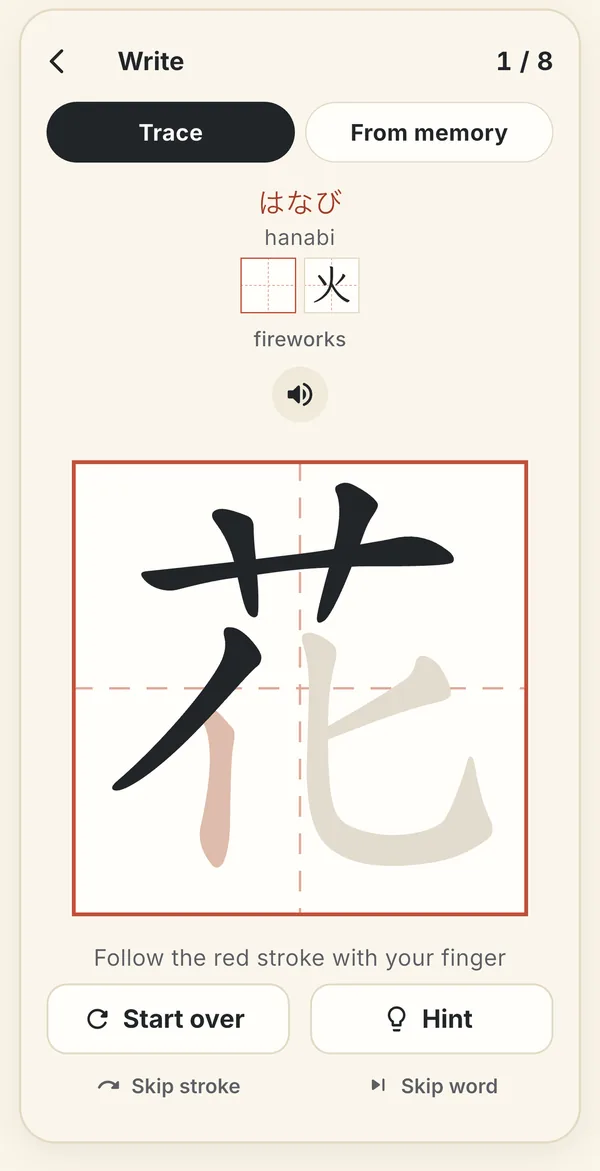
Trace mode: follow the red stroke. The ink shows what you have written so far. Step 3: When you get stuck
- Hint helps when you can't remember the next stroke.
- Start over clears the character.
- Skip stroke moves past one stroke.
- Skip word skips one word inside a long sentence.
Step 4: Choose the stroke-order standard
Stroke order differs between places. On a list with Chinese characters or kana, tap the region line on the list to open Region and stroke order and choose China, Singapore, Malaysia, Taiwan or Japanese kanji.
Step 5: Watch the stroke order of any word
Tap a word in a reading or a list to see its stroke order. Tap the character to replay it.
Still stuck? The app has its own Help & FAQ under Settings, or write to [email protected]. A real person reads every message.