
Guides · 05 / 10
Week Pack: this week's list, in sentences
A word list is easier to learn when the words are in sentences. The Week Pack takes this week's list and makes example sentences for each word, a short reader made of words the learner knows, and question cards for a parent.
The pack is written by AI on our server, so it can have mistakes. Read it through before you use it with a child.
Step 1: Make the pack from a list
Open the list and find the This week's pack card. Tap Make this week's pack.
The first time you use an AI feature, the app asks first and explains what will be sent. Tap Allow to go on or Not now to keep AI features off.
Step 2: Read what's inside
The pack has three parts:
- Sentences: example sentences for every word, each with its reading, a play button and a record button.
- Reader: a short reading of 6 to 8 lines, made of words the learner already knows.
- Questions to ask: cards for you, in your language. Ask, wait, then answer with the sentence.
Buttons in the top bar turn the reading line and the translation on or off under each sentence. Translations use Apple's on-device translation (iOS 18 or later).
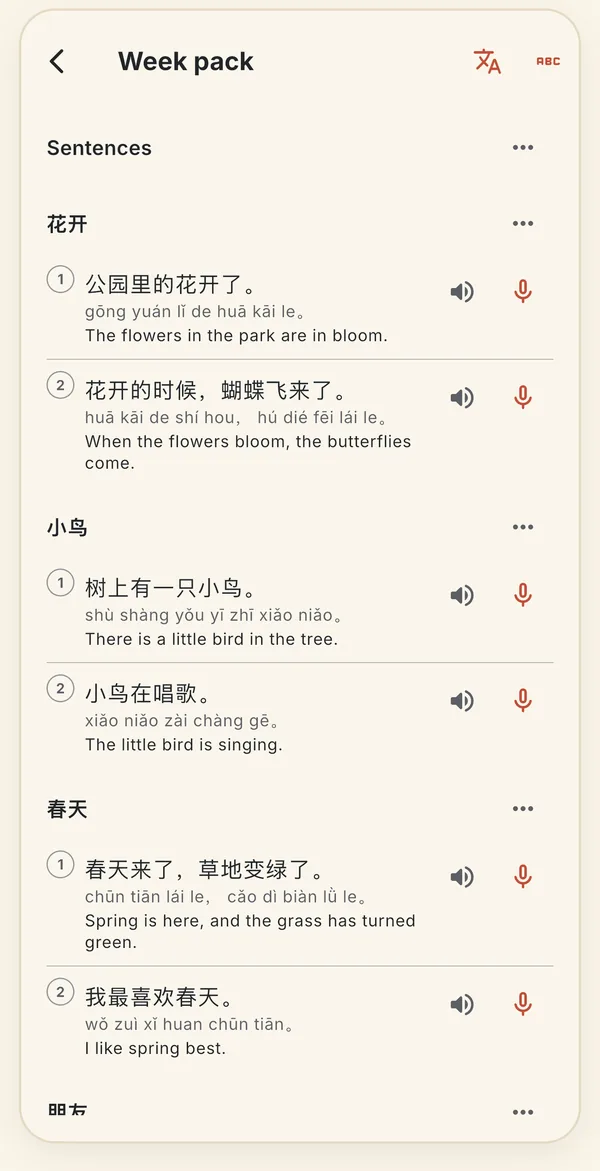
Two sentences for each word of the list, with pinyin and a translation. Step 3: Follow the week on the Week tab
The pack becomes the plan on the Week tab: listen, read aloud, dictation, a test sheet, Paper Check and the misses. The card always shows the next step as one button.
Open as a reading puts the reader in Read, where you can play it and record it sentence by sentence.
Step 4: Add sentences without a whole pack
On a list, Get sentences adds an example sentence with a translation to the words that have none. A word that gets no sentence is asked again after 24 hours or when you tap Get sentences again.
Step 5: Know the allowance
Free: 3 packs and 60 sentence words in total. Pro: 10 packs and 200 sentence words a week. Only what worked counts, and the app shows how many are left.
Pro can also make a new pack of the same list (Make a new pack) and open Past weeks.
Still stuck? The app has its own Help & FAQ under Settings, or write to [email protected]. A real person reads every message.